If you're running into issues with an older version of Overwolf, updating to the latest version may resolve the problem. You can use the setup installer to update your existing installation without deleting or reinstalling Overwolf completely.
Follow the steps below:
Step 1: Close Overwolf
If Overwolf is running in the background, close it from the Windows system tray before continuing.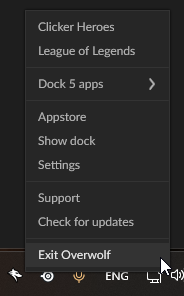
Step 2: Download the Setup Installer
Download the setup installer from this link: Overwolf Setup Installer
Step 3: Extract the Installer
The installer is provided as a zipped file.
Use a tool like WinZip, WinRAR, or 7-Zip to extract the contents.
Step 4: Run the Installer
After extracting the files, double-click setup.exe.
Follow the on-screen instructions to complete the update.
Note: Running the setup installer simply updates your current Overwolf version. It does not remove your apps or reinstall Overwolf from scratch.
Step 5: Launch Overwolf
Once the update is finished, open Overwolf from your desktop or Start Menu.
You should now be using the latest version.
If you’re still having issues after updating, please open a support ticket.